


Updated:
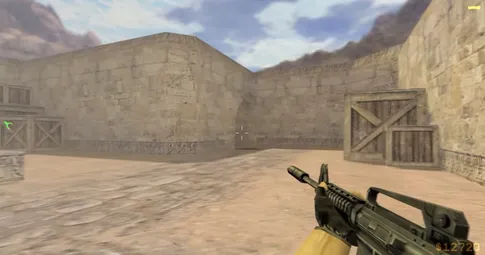
Let's be precise about what "CS 1.6 HD" can honestly mean. The game was never remastered — there is no official high-resolution texture pack, and this build does not pretend otherwise. What a modern PC can give you is the original game rendered the way it always deserved to be: your monitor's native widescreen resolution, a rock-solid high frame rate, and instant loading. That is what this page sets up.
- Native widescreen resolutions in the video options
- High-FPS config included — fps_max 100 out of the box
- 100+ FPS trivial on any modern GPU, integrated graphics included
- Original content — no texture replacements, no fake "remaster"
# CS 1.6 HD
Widescreen and native resolution
In 2003 almost everyone played CS 1.6 at 800×600 or 1024×768 on a CRT. On a modern monitor, the single biggest visual upgrade is simply selecting your native resolution: open Options → Video and pick the widescreen mode that matches your display. Geometry gets sharp edges, distant player models become readable at long range — think dust2 long or awp sightlines on trains — and text and HUD elements stop looking smeared. There is nothing else to configure; the engine handles modern resolutions directly, with no launch parameters or third-party tools.
The high-FPS config
Frame rate in GoldSrc is capped by the fps_max variable, and this build ships with a tuned high-FPS config that sets fps_max 100 — the classic competitive standard — along with settings that prioritize input responsiveness over eye candy you would not notice anyway. A constant 100 FPS matters more than a higher, unstable number: aim feels identical in every fight, and movement timing stays consistent. If you play on a 144 Hz or 240 Hz monitor, raise fps_max in the console to match your refresh rate; the hardware headroom is there many times over.
Why GoldSrc flies on modern hardware
The GoldSrc engine was written for machines with a 1.2 GHz CPU and a 32 MB video card. A modern GPU is thousands of times more capable than the hardware the engine was tuned for, which is why CS 1.6 behaves like no other game on a current PC: maps load in a second or two, alt-tab is instant, and the frame rate simply does not drop — not in smokes, not in five-versus-five firefights, not with a full server of players on screen. Even a laptop on integrated graphics exceeds the recommended requirements many times over. The performance ceiling is so high that the frame cap, not the hardware, is the only limit you will meet.
Honest limits: what HD is not
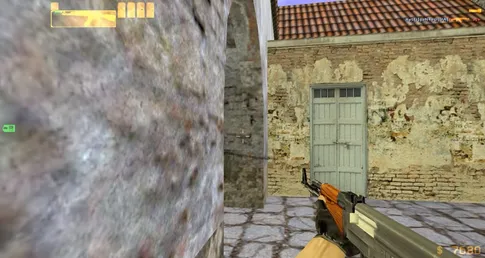
What clean rendering will not do is make CS 1.6 look like a new game. Textures are the original low-resolution ones, models are the classic low-poly CTs and Ts, and up close the game looks its age — that is by design, and most veterans would not have it any other way. This build deliberately keeps every asset original, because "HD texture packs" from unknown sources change how the game reads: brighter walls, altered player silhouettes, different visibility. If untouched content is exactly what you want, the original version page explains our no-modifications philosophy in full. Sharp resolution, high FPS, original art — that combination is the real "CS 1.6 HD."
Native resolution screenshots


Frequently asked questions
Is CS 1.6 HD a remaster with new textures?
No. CS 1.6 was never remastered, and this build does not replace any textures or models. "HD" here means the original game rendered cleanly at your monitor’s native resolution with high, stable FPS — sharp, correct, and exactly as the game is meant to look, not a fan-made graphics overhaul.
Does CS 1.6 support widescreen resolutions?
Yes. The video options include widescreen resolutions, so you can run the game at your monitor’s native resolution on a modern 16:9 display. Native resolution gives the sharpest picture — the classic maps and models render crisply without any stretching artifacts from running a low resolution fullscreen.
What FPS can I expect on a modern PC?
A locked 100 FPS is trivial — the included config targets it with fps_max 100, and even integrated graphics hold it without drops. The game was built for 2003 hardware, so a modern GPU has enormous headroom; frame drops on a current PC essentially do not happen.
Can I raise the FPS cap above 100 for a high refresh monitor?
Yes. The cap is just the fps_max value in the console or config, and modern hardware can push far beyond it. 100 FPS is the classic competitive standard and the default this build ships with, but on a 144 Hz or 240 Hz monitor you can raise fps_max to match your refresh rate.
Do I need a powerful GPU for CS 1.6 at high resolution?
No. The recommended spec is a 1.6 GHz CPU, 1 GB of RAM, and a 128 MB video card — hardware from two decades ago. Any modern machine, including laptops with integrated graphics, runs the game at native resolution and full FPS effortlessly.
Download the build, set your native resolution, and the "HD" part takes care of itself — the config does the tuning, and your hardware does the rest. Installation takes about a minute; the install guide walks through every step if you want it.